Appearance
Drop Zone Folder
Each subfolder from the root of the SFTP server is referred to as a Drop Zone Folder. This folder contains input data files in addition to the pipeline Configuration File.
A Drop Zone Folder cannot contain subfolders (the results folder generated by the pipeline is an exception to this).
The following is an example of a tree view of the SFTP server after files are copied. In the example, two Drop Zone Folders have been created:
root
├── 2025-03-01
│   ├── config.json
│   ├── hris.json
│   └── payroll.csv
└── 2025-04-01
    ├── config.json
    ├── hris.json
    └── payroll.csv
The results/ folder that would be generated by the pipeline is omitted from the folder view above.
Once config.json is copied to the SFTP server, a pipeline is triggered immediately. Results from the pipline (e.g. errors or assets generated as a result from the pipeline) are left in the results/ subfolder. An example of a tree view of the SFTP server after the pipeline is executed looks as follows:
root
└── 2025-04-01
    ├── config.json
    ├── hris.json
    ├── payroll.csv
    └── results
        └── results.json
Automated detection of source data files
The DataBridge Engine will automatically detect correctly formatted data files in the Drop Zone Folder and convert them to Data Frames which can be used for subsequent pipeline steps.
The formatting for files in a Drop Zone folder is described for each supported file format below.
JSON
Top-level array where each line is a dictionary where each line in the array contains the same set of fields.
json
[
  {
    "empid": 1,
    "gender": "male",
    "jobrole": "engineering",
    "salary": 1234
  },
  {
    "empid": 2,
    "gender": "female",
    "jobrole": "legal",
    "salary": 12350
  }
]
CSV
A CSV file, formatted using the following configuration:
- Encoding: UTF-8
- Field delimiter: Comma (,)
- Header row: Present
- Line endings: Either \n or \r\n
- Uniform number of fields per row
- Quoting: Double quotes ("value")
- Decimal separator: Point (.)
An example of a legal CSV file is as follows:
text
empid,gender,jobrole,salary
1,male,engineering,1234
2,female,legal,12350
Excel
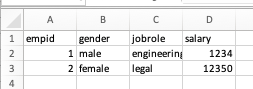
An .xlsx file (the legacy .xls format is not supported), where row 1 indicates field names and each subsequent row contains one line of data. Reading of the Excel file concludes once the first empty row is encountered.
An example of a legal Excel file follows:
Source Data File names
Files formatted as described above are automatically converted to a Data Frame where the name of the Data Frame is the same as the file name but without the extension. As an example, the employees.xlsx file is converted to the employees Data Frame which can be referenced by transformations, validations and destination adapters in later pipeline steps.
WARNING
Naming for Data Frames is restricted, allowed symbols are:
- Lowercase letters,
a-z - Numbers,
0-9 - Underscore,
_
As a result, the file employees-france.csv is not automatically processed and requires a configuration under the drop_zone_files configuration section where a legal Data Frame is specified. If possible, choose a legal filename (e.g. employees_france.csv) as this simplifies the required configuration.
Configuration for Drop Zone Folder files
In some cases, automated detection of files in the Drop Zone Folder is not suitable. These cases include:
- The source data file names are generated by upstream systems, and it's not feasible to manipulate the file names before they enter the pipeline.
- The files are encrypted (e.g. PGP encryption or password protected excel files)
For these cases, configuration may be provided under the drop_zone_files configuration section.
For configuration details, visit the drop_zone_files section.